Devlog 3: Smooth Vote Animations - Interpolating Between Server Updates
After implementing vote batching, I had a new problem. Votes sync from Supabase every 1-2 seconds, which means the vote counter would jump from 1000 to 1150 to 1290 in discrete steps. It looked janky.
I wanted the counter to count up smoothly, like it's continuously updating, even though the real data only arrives once per second.
The Problem: Discrete Updates vs Smooth UI
Here's what I had:
- Server sends vote counts every 1 second (because of batching)
- Counter jumps from 1000 → 1150 → 1290
- Feels choppy and disconnected
What I wanted:
- Counter smoothly counts up from 1000 to 1150 over the course of 1 second
- Feels continuous and alive
- Matches the real-time energy of the game
The solution: interpolation.
Building an Interpolated Store
I created a wrapper around the matchup store that interpolates between values:
export function createInterpolatedStore(matchupStore) {
  const { subscribe } = writable({
    votesA: 0,
    votesB: 0
  });

  let targetA = 0;
  let targetB = 0;
  let currentA = 0;
  let currentB = 0;
  let lastUpdateTime = Date.now();

  // Subscribe to real data
  matchupStore.subscribe(data => {
    targetA = data.votesA;
    targetB = data.votesB;
    lastUpdateTime = Date.now();
  });

  // Animation loop at 60fps
  function animate() {
    const now = Date.now();
    const elapsed = now - lastUpdateTime;
    const progress = Math.min(elapsed / 1000, 1); // 1 second duration

    // Ease toward target
    currentA = easeOut(currentA, targetA, progress);
    currentB = easeOut(currentB, targetB, progress);

    update({ votesA: currentA, votesB: currentB });
    requestAnimationFrame(animate);
  }

  animate();

  return { subscribe };
}
This creates a 60fps animation loop that smoothly transitions from the current value to the target value over 1 second.
Cubic Bezier Easing
I initially used linear interpolation (just lerp), but it looked robotic. Linear easing means the counter accelerates and decelerates instantly, which feels mechanical.
I switched to cubic Bezier easing (specifically ease-out), which decelerates near the target. This same Bezier curve technique later proved invaluable for creating organic particle motion:
function cubicBezierEaseOut(t: number): number {
  return 1 - Math.pow(1 - t, 3);
}

function easeOut(current: number, target: number, progress: number): number {
  const eased = cubicBezierEaseOut(progress);
  return current + (target - current) * eased;
}
This creates a natural feeling acceleration: the counter starts fast and gradually slows as it approaches the target value. It feels way more organic.
Handling Late Updates
One edge case: what if the next server update arrives before the animation finishes? I don't want the counter to snap backwards or do weird things.
The fix:
matchupStore.subscribe(data => {
  // Only update if new value is higher (votes only go up)
  if (data.votesA > targetA) {
    targetA = data.votesA;
    lastUpdateTime = Date.now();
  }
  if (data.votesB > targetB) {
    targetB = data.votesB;
    lastUpdateTime = Date.now();
  }
});
Now if updates arrive faster than expected, the counter just smoothly transitions to the new target. If updates are slow, the counter reaches the target and waits.
The Difference It Makes
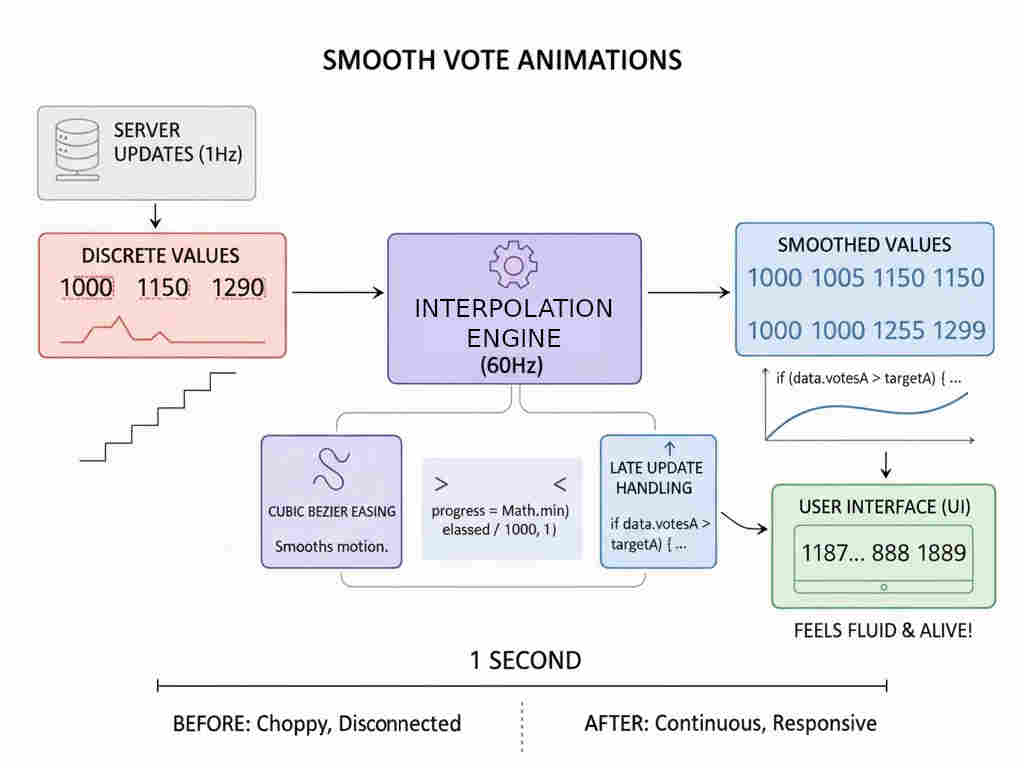
Before interpolation: Vote counts jump around like a broken odometer. Feels disconnected from the action.
After interpolation: Numbers smoothly count up, creating the illusion of continuous updates. Feels alive and responsive.
It's a perfect example of lying to improve user experience. The truth is votes arrive in 1-second batches, but the UI pretends they're continuous. Users don't care about the truth. They care about how it feels.
Performance Considerations
Running a 60fps animation loop for vote counts sounds expensive, but it's actually fine:
requestAnimationFrameonly runs when the tab is visible- The math is trivial (just interpolation)
- Svelte's reactivity handles the DOM updates efficiently
I tested with 20 simultaneous matchups on screen (worst case), and frame rates stayed at 60fps. No problem.
When Not To Use This Pattern
Interpolation works great for vote counters because:
- Values only increase (monotonic)
- Approximate values are fine (being off by a few votes doesn't matter)
- Smoothness is more important than precision
I would NOT use this for:
- Bank account balances (precision matters)
- Countdown timers (going backwards would be confusing)
- Anything where the exact value is critical
But for a voting game? Perfect fit.
Takeaway
The user experience is often about perception, not reality. Technically, votes arrive in batches. Perceptually, they feel continuous.
Easing functions matter way more than I thought. Linear interpolation looks bad. Cubic Bezier looks natural. It's a tiny detail that makes a huge difference.
60fps animation loops are cheap if you're just doing simple math. Don't be afraid of requestAnimationFrame for UI polish.
This is the kind of detail that most users won't consciously notice, but they'll definitely feel it. The game just feels smoother and more responsive. That's what matters.
These animation techniques work together with other visual polish like PixiJS particle effects to create a satisfying clicker experience.