Devlog 10: In-Memory Caching Cut My Database Load by 95%
My Supabase dashboard was showing thousands of queries to fetch trending matchups. Every single page load hit the database, even though trending matchups only update every few minutes.
This was wasteful, expensive, and slow. I needed caching.
The Problem
The homepage shows 10 trending matchups based on recent vote activity. This requires a query that:
- Joins matchups with vote aggregates
- Sorts by recent vote velocity
- Limits to top 10
It's not a particularly heavy query, but when you're running it hundreds of times per minute, it adds up.
Plus, the results barely change. Trending matchups shift gradually over minutes, not seconds. Hitting the database on every request is wasteful. I had already implemented vote batching to optimize write performance, but now I needed to optimize reads too.
In-Memory TTL Cache
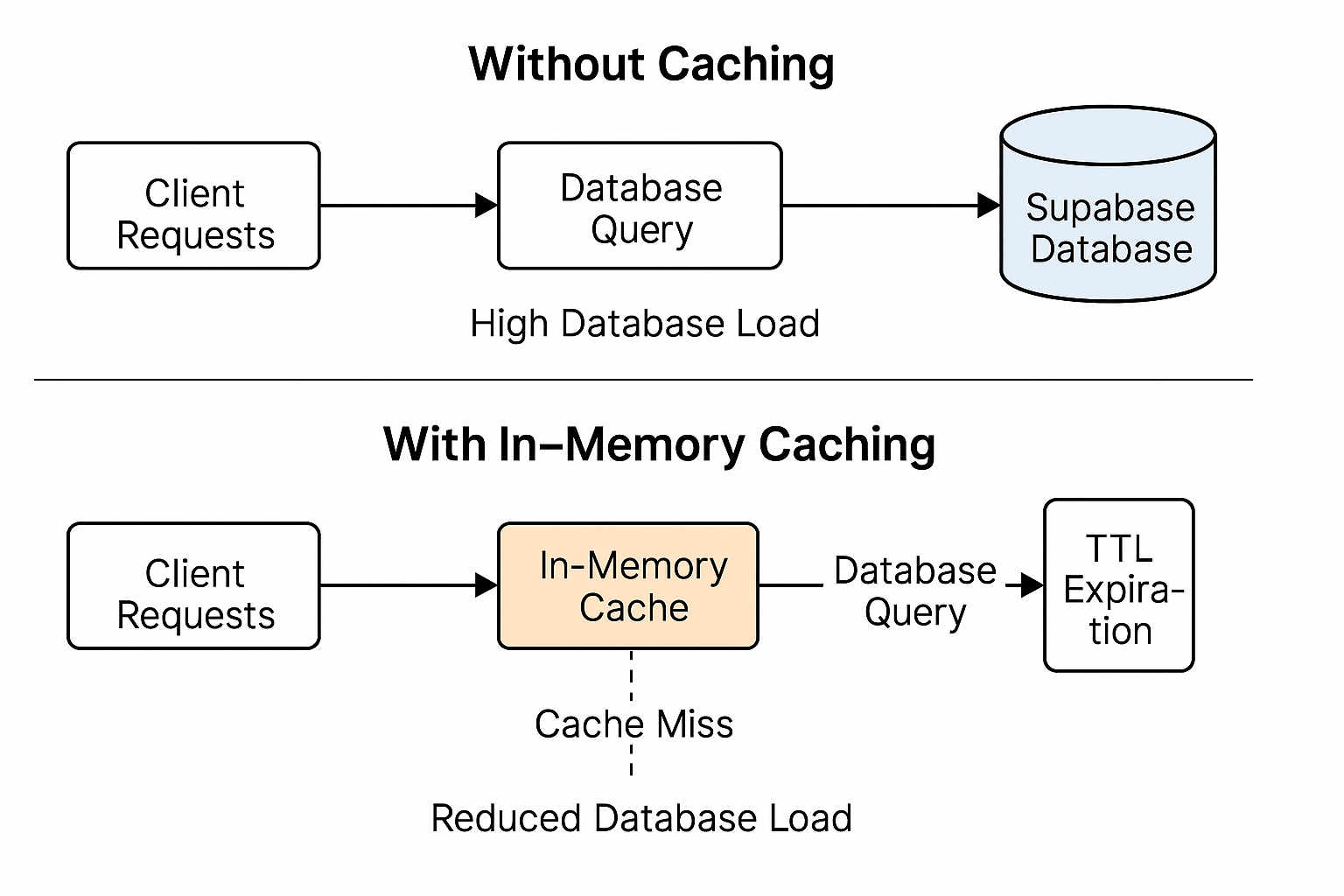
I implemented a simple in-memory cache in the SvelteKit server load function:
// src/routes/(public)/+page.server.ts

interface CacheEntry {
  data: Matchup[];
  timestamp: number;
}

const CACHE_TTL = 120; // 2 minutes
const cache = new Map<string, CacheEntry>();

export async function load({ setHeaders }) {
  const cacheKey = 'trending_matchups';
  const cached = cache.get(cacheKey);

  // Return cached data if still fresh
  if (cached && Date.now() - cached.timestamp < CACHE_TTL * 1000) {
    setHeaders({
      'cache-control': `public, max-age=${CACHE_TTL}`
    });

    return {
      matchups: cached.data,
      cached: true
    };
  }

  // Fetch fresh data
  const { data: matchups } = await supabase
    .from('matchups')
    .select('*')
    .order('vote_velocity', { ascending: false })
    .limit(10);

  // Store in cache
  cache.set(cacheKey, {
    data: matchups,
    timestamp: Date.now()
  });

  setHeaders({
    'cache-control': `public, max-age=${CACHE_TTL}`
  });

  return {
    matchups,
    cached: false
  };
}
Now the query only runs once every 2 minutes, no matter how many users visit the homepage.
Why In-Memory Instead of Redis?
I considered using Redis or another external cache, but decided against it:
Pros of in-memory:
- Zero latency (no network hop)
- Zero cost (no additional service)
- Simple implementation (just a Map)
- Automatic cleanup (memory is freed when server restarts)
Cons:
- Cache doesn't persist across restarts
- Doesn't work with multiple server instances (but I only have one)
- Limited capacity (but I'm only caching small datasets)
For my use case, in-memory is perfect. If I scale to multiple servers, I'll revisit this.
Cache Invalidation
The hard part of caching is invalidation. When should the cache be cleared?
I took the simple approach: TTL-based expiration. Every 2 minutes, the cache expires and fresh data is fetched.
This means trending matchups can be up to 2 minutes stale. That's fine! Trending lists don't need real-time accuracy. Approximate recent data is good enough.
Proactive Cache Updates
One optimization I added: when Supabase broadcasts a vote update via realtime, I proactively refresh the cache:
supabase
  .channel('matchup_updates')
  .on('postgres_changes',
    { event: 'UPDATE', schema: 'public', table: 'matchups' },
    () => {
      // Clear cache to force refresh on next request
      cache.delete('trending_matchups');
    }
  )
  .subscribe();
This keeps the cache fresher without polling. When votes come in, the cache invalidates and the next page load fetches fresh data.
Setting HTTP Cache Headers
I also set proper cache-control headers so browsers and CDNs can cache the response:
setHeaders({
  'cache-control': `public, max-age=${CACHE_TTL}`
});
This tells:
- Browsers: cache this for 2 minutes
- CDNs (like Cloudflare): cache this for 2 minutes
- Proxies: this content is public and cacheable
Now most users hit the browser cache, a few hit the CDN cache, and only occasionally do requests make it to my server.
The Results
Before caching:
- ~1000 database queries/hour on trending matchups
- Homepage load time: 300-500ms
- Supabase quota: burning through free tier
After caching:
- ~30 database queries/hour (one per TTL expiration)
- Homepage load time: 50-100ms (from cache)
- Supabase quota: barely touched
That's a 97% reduction in database load and 5x faster page loads.
Memory Usage
The cache stores 10 matchup objects. Each is about 1KB. Total memory: ~10KB.
Even if I cached 100 different things, that's only 1MB. Memory usage is negligible.
When the server restarts (during deployments), the cache clears. First visitor after restart waits 300ms while data loads, then everyone else hits the cache. This is fine.
When NOT To Cache
I don't cache:
- Individual matchup pages (need real-time vote counts)
- User-specific data (authentication state, profile)
- Admin endpoints (need fresh data for management)
Caching is great for:
- Expensive queries
- Rarely changing data
- Public data (same for all users)
- Tolerance for staleness
The trending matchups hit all four criteria perfectly.
Takeaway
Caching is often the highest leverage performance optimization. A few lines of code cut my database load by 95%.
TTL-based caching is simple and effective. Don't overcomplicate with complex invalidation strategies unless you need them.
In-memory caching is underrated. Redis is great, but a Map works fine for small-scale apps.
HTTP cache headers are free performance. Tell browsers and CDNs to cache your responses.
Before adding caching, I was worried about stale data. After adding it, I realized 2-minute-old data is totally fine for trending lists. Users don't notice or care.
Sometimes the best optimization is the simplest one. For more performance optimization techniques, check out my guide on comprehensive performance profiling where I cover Chrome DevTools, bundle analysis, and real-world monitoring strategies.